Binance Pay Merchant Review: Fees, KYB, Countries and Limits
Binance Pay lists no fee on standard merchant payments, but only Binance users can pay, KYB is required and US, Canada and Dutch firms are excluded.
 Kevin Richards
The Short Answer
- What it costs: Binance's fee schedule (updated 2 January 2026) lists no fee for standard merchant payments by QR code, hosted checkout, payment link, invoice or the WooCommerce plugin. Payouts have cost 0.8%, capped at $5, since 1 December 2024. Mini Program merchants pay 1%, plus a $1,000 monthly minimum if they processed under $90,000 in the previous quarter.
- Who can pay you: only people with a Binance account. Payments move off-chain between Binance accounts, and there is no deposit address for customers paying from an outside wallet.
- Who holds the money: Binance. Payments settle instantly, in crypto or stablecoins, into your Binance account. There is no payout to a bank account.
- Verification: full KYB. You need a Binance entity (corporate) account, company documents and IDs for your directors and beneficial owners.
- Who can't use it: businesses and people in the US (including companies operating there), Canada, the Netherlands or sanctioned regions, and sellers of adult content, tobacco, e-cigarettes or weapons.
- Who it suits: registered businesses outside those countries whose customers already keep crypto on Binance, and which are happy to be paid in crypto.
Last checked: 6 October 2026. We read Binance's merchant pages, merchant documentation and Pay API reference, the Binance Pay fee schedule, the Binance Pay Product Terms (version 1.1), the merchant application FAQ, the List of Prohibited Countries and the Prohibited Use Policy. We also checked the WordPress.org plugin record, searched the Shopify App Store, and looked up the provider on the ADGM financial regulator's public register and the US Department of Justice's 2023 case record. We did not open a merchant account or make a payment, so nothing here is a first-hand checkout, payout or support test.
Affiliate disclosure: Payyd earns a commission from some gateways it links to. It has no commission arrangement with Binance, so the Binance Pay link on this page earns Payyd nothing.
Binance Pay Merchant is the business side of Binance Pay, the payment feature built into the Binance exchange. A verified business can take payments from Binance users through QR codes, a Binance-hosted checkout page, payment links, emailed invoices, direct debit, its API or an official WooCommerce plugin. Under the Binance Pay Product Terms (version 1.1, in force since 24 March 2026), the service is provided by Nest Trading Limited, which is authorised by the Financial Services Regulatory Authority (FSRA) of Abu Dhabi Global Market.
Binance's merchant page says Binance Pay has processed $280 billion since 2021 and had more than 48 million users in 2025, figures it dates to December 2025. Those users are the only people who can pay you through it, which shapes everything else in this review.
Fees
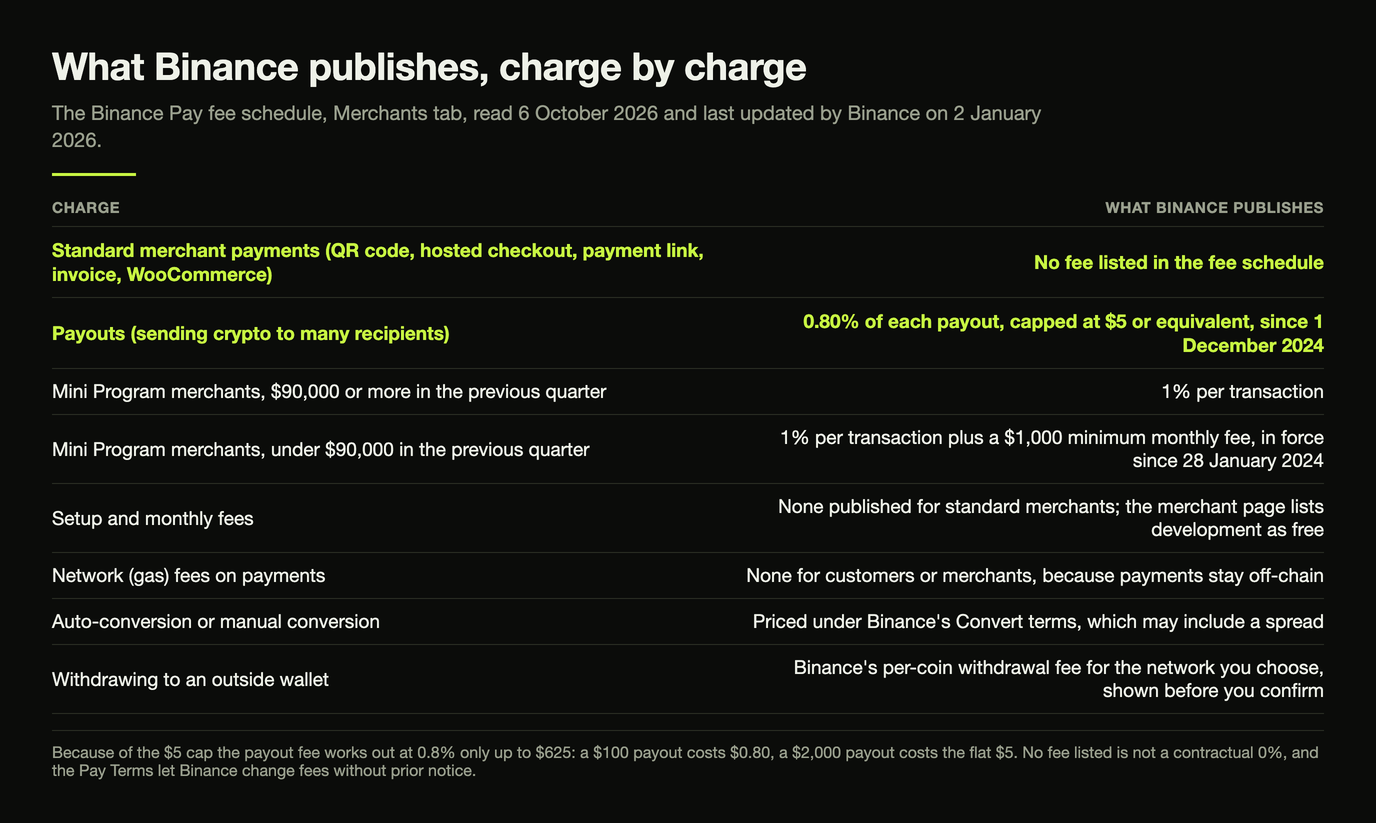
Binance publishes its merchant charges on a single Binance Pay Fees page, under a Merchants tab. As of 6 October 2026 (page updated 2 January 2026), it lists only two kinds of merchant fee: one for Mini Program merchants and one for payouts. Nothing is listed for ordinary merchant payments. (Mini Programs are apps that run inside the Binance app.)
| Charge | What Binance publishes |
|---|---|
| Standard merchant payments (QR code, hosted checkout, payment link, invoice, WooCommerce) | No fee listed in the fee schedule |
| Payouts (sending crypto to many recipients) | 0.80% of each payout, capped at $5 or equivalent, since 1 December 2024 |
| Mini Program merchants, $90,000 or more in the previous quarter | 1% per transaction |
| Mini Program merchants, under $90,000 in the previous quarter | 1% per transaction plus a $1,000 minimum monthly fee (in force since 28 January 2024) |
| Setup and monthly fees | None published for standard merchants; the merchant page lists development as free |
| Network (gas) fees on payments | None for customers or merchants, because payments stay off-chain |
| Auto-conversion or manual conversion | Priced under Binance's Convert terms, which may include a spread |
| Withdrawing to an outside wallet | Binance's per-coin withdrawal fee for the network you choose, shown before you confirm |
Because of the $5 cap, the payout fee works out at 0.8% only up to $625. A $100 payout costs $0.80, while a $2,000 payout costs the flat $5.
Read the fee picture with three caveats:
- "No fee listed" is not a contractual 0%. Binance's merchant pages talk about lower payment costs rather than quoting a rate. The Pay Terms say fees can include merchant fees and a spread as set out in the fee schedule, and that Binance can change them without prior notice. Check the fee clause of the merchant agreement you sign.
- Binance's own pages disagree on payouts. The Payout product page still advertises a zero service fee, but the dated fee schedule says payouts have been chargeable since 1 December 2024. Budget for 0.8%.
- Getting money out costs something. Payments land in your Binance account. Moving them to your own wallet costs Binance's network withdrawal fee for that coin, and turning them into another asset goes through Binance Convert. Our exchange withdrawal fees guide explains how those fees vary by network.
How Customers Pay, and Who Can't
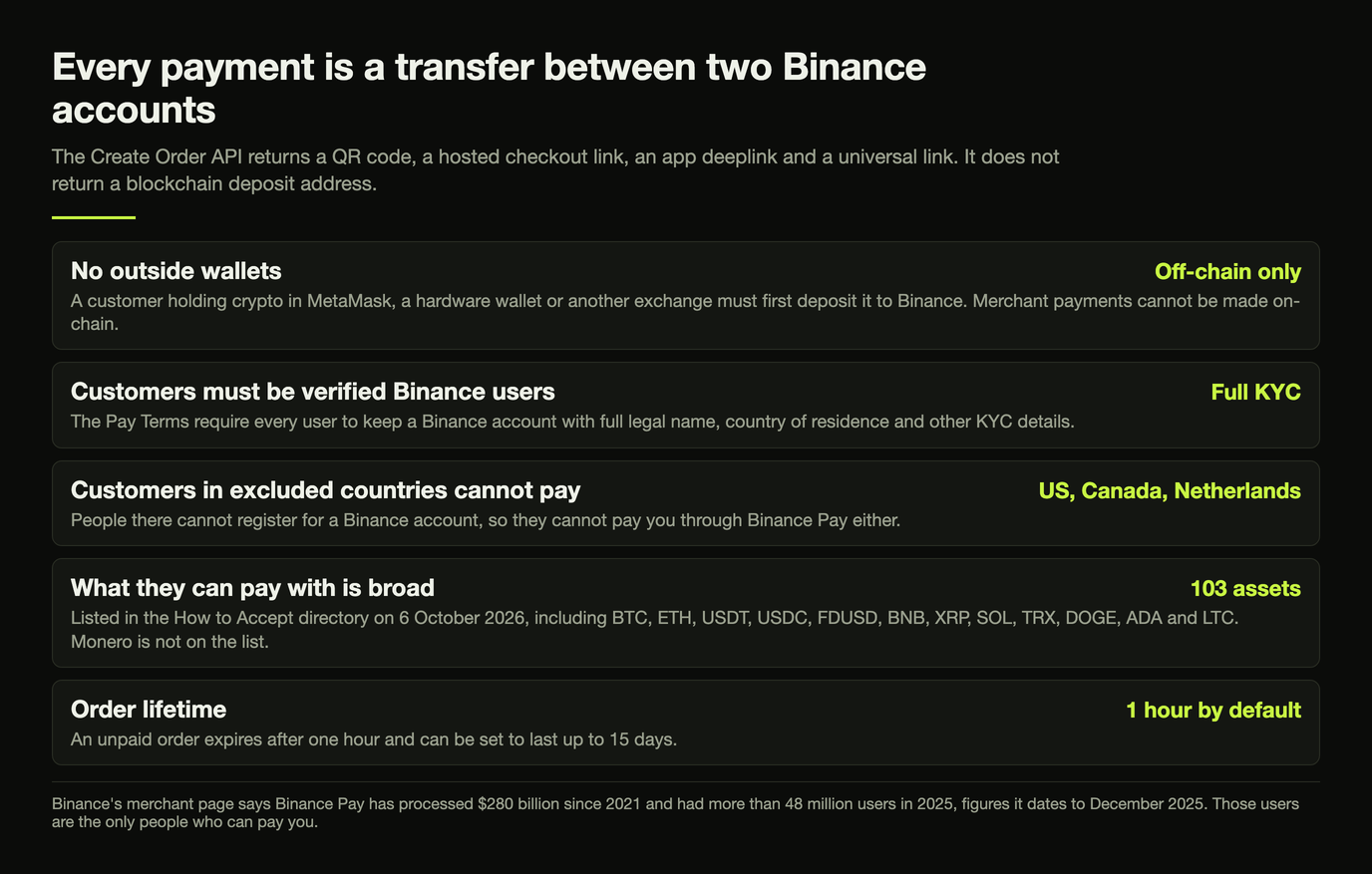
Every Binance Pay merchant payment is a transfer from the customer's Binance account to yours. When your site creates an order, Binance's Create Order API returns a QR code, a link to a Binance-hosted checkout page, an app deeplink and a universal link. It does not return a blockchain deposit address. The customer pays one of three ways:
- scanning your QR code with the Binance app, online or at the counter;
- opening the Binance app from a link or button on your site;
- logging in to their Binance account on the hosted checkout page.
That has three consequences for who can pay you:
- No outside wallets. A customer holding crypto in MetaMask, a hardware wallet or another exchange must first deposit it to Binance. Binance Pay merchant payments cannot be made on-chain.
- Customers must be verified Binance users. The Pay Terms require every user to keep a Binance account with full legal name, country of residence and other KYC details.
- Customers in excluded countries cannot pay. People in the US, Canada and the Netherlands cannot register for a Binance account (see below), so they cannot pay you through Binance Pay either.
What customers can pay with is broad. Binance says it supports more than 100 assets, and its How to Accept directory listed 103 on 6 October 2026. These include BTC, ETH, USDT, USDC, FDUSD, BNB, XRP, SOL, TRX, DOGE, ADA and LTC. Monero is not on the list. Merchants can price an order in a crypto asset, or in a fiat currency that Binance converts into a USDT or USDC order at the market rate, and can limit which coins a customer may pay with. An unpaid order expires after one hour by default, and can be set to last up to 15 days.
If you sell into the EU, note that Binance applies MiCA restrictions to stablecoins that are not authorised in the European Economic Area for users there. Its API documentation says MiCA users can use USDC. Our guide to crypto gateways in Europe covers this in more depth.
Settlement, Custody and Refunds
The Pay Terms define settlement as the moment the customer's crypto moves from their Binance account to the merchant's Binance account. Binance's merchant page describes this as instant, real-time settlement in crypto or stablecoins.
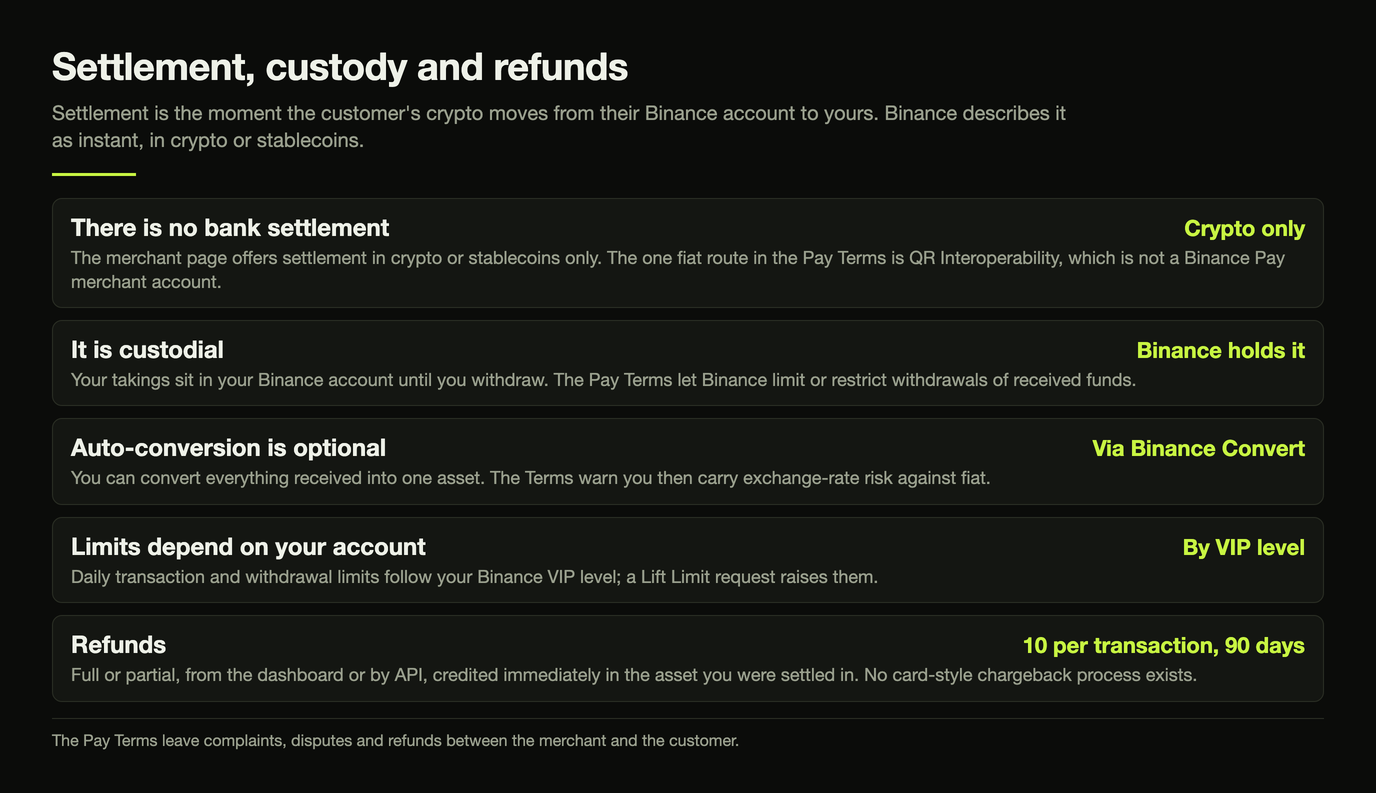
- Auto-conversion is optional. You can tell Binance to convert everything you receive into one asset you choose, such as USDT. The conversion runs through Binance Convert at its pricing, and the Terms warn that you then carry exchange-rate risk against fiat.
- There is no bank settlement. The merchant page offers settlement in crypto or stablecoins only. The only fiat settlement in the Pay Terms is QR Interoperability, where Binance users pay merchants on local QR payment networks in some countries and a local payment provider pays those merchants in local currency. That is not a Binance Pay merchant account. If you need bank payouts, see our fiat-settlement gateways.
- It is custodial. Your takings sit in your Binance account until you withdraw them. The Pay Terms let Binance limit or restrict withdrawals of received funds, for example if a transfer would break the law, exceed your limits, or Binance cannot verify your identity or source of funds.
- Limits depend on your account. The merchant FAQ says daily transaction and withdrawal limits depend on your Binance VIP level. You can raise them by submitting a "Lift Limit" request with more information about your business.
- Withdrawing. In the Merchant Management Platform, go to Balances and then Withdraw. Choose the coin, address and network, check the network fee, and confirm with two-factor authentication.
Refunds and disputes. You can refund a paid order in full or in part, from the dashboard or by API. Binance's documentation says the customer is credited immediately, in the asset you were settled in. Each transaction can be refunded up to 10 times, and the Pay Terms say Binance Pay cannot process refunds a merchant starts more than 90 days after the purchase. There is no card-style chargeback process: the Terms leave complaints, disputes and refunds between the merchant and the customer. Our crypto refunds guide covers refund policies for crypto checkouts.
KYB and Onboarding
Binance Pay is not a light-KYC gateway. Binance's merchant application FAQ (updated 17 December 2025) sets out the process:
- Open a Binance entity account. If you used the same email for a personal Binance account, you cannot upgrade it and must apply with another email.
- Apply as a Direct Merchant (a shop or online business) or a Channel Partner (a licensed payment company, or a technical service provider that integrates merchants).
- Complete entity verification. Binance's list of documents, which it says is not exhaustive, includes:
- your certificate of incorporation and business registration;
- your memorandum and articles (or equivalent);
- a letter of authorisation dated within the last three months;
- an official company report from the last 12 months listing directors, beneficial owners and their holdings;
- an ownership structure chart;
- passport or ID copies for directors, beneficial owners and traders;
- a sanctions questionnaire.
- Sign the Binance Pay agreement in the Merchant Management Platform, then generate API keys.
Binance says it rejects any application that does not meet regulatory requirements, may ask for more documents, and allows one merchant account per business. Some Binance product pages still say "individual merchants" can use QR codes and payment links. However, the current application path starts with an entity account, so plan for full KYB.
Excluded Countries and Banned Businesses
Binance's List of Prohibited Countries (updated 5 January 2026) applies to anyone registering for a Binance account. That covers both merchants and their customers:
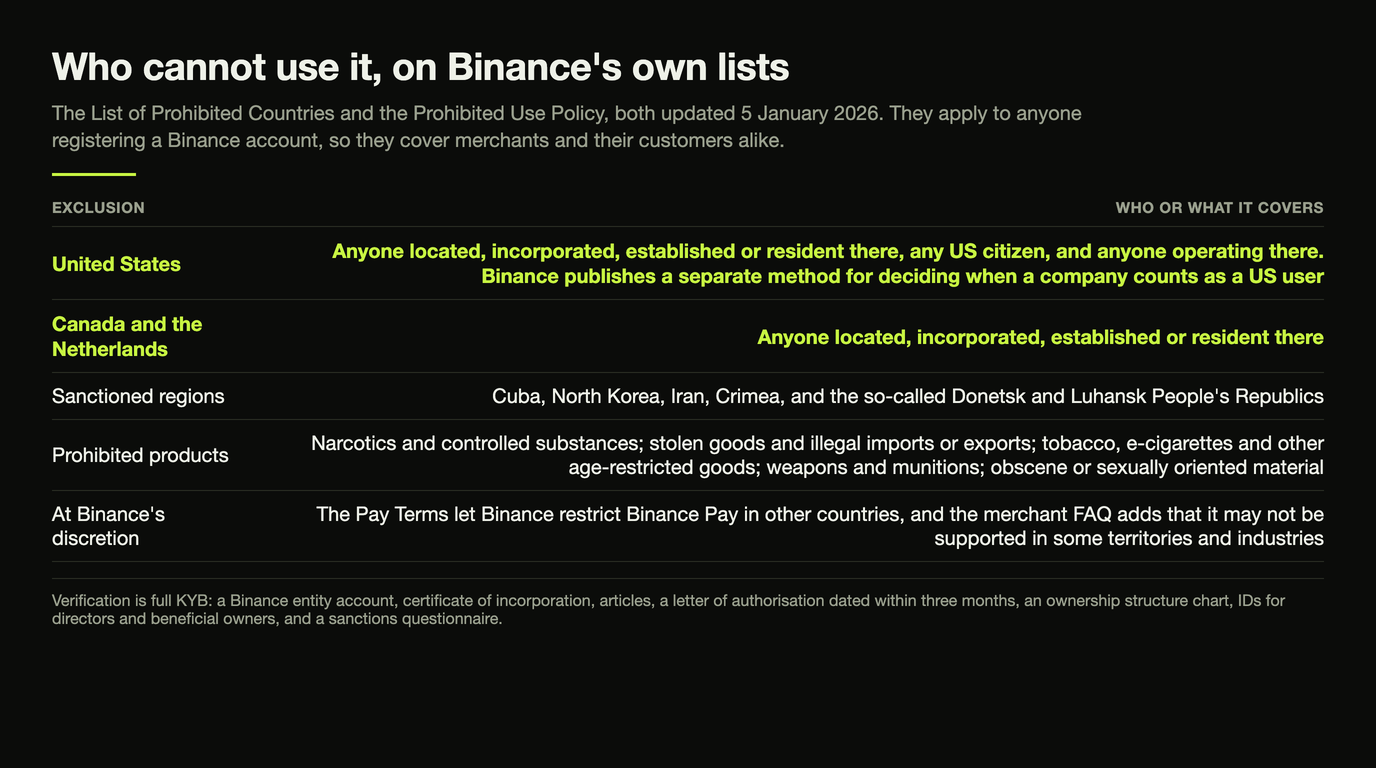
- United States: anyone located, incorporated, established or resident there, any US citizen, and anyone operating there. Binance publishes a separate method for deciding when a company counts as a US user.
- Canada and the Netherlands: anyone located, incorporated, established or resident there.
- Sanctioned regions: Cuba, North Korea, Iran, Crimea, and the so-called Donetsk and Luhansk People's Republics.
The Pay Terms also let Binance restrict Binance Pay in other countries at its discretion. Its merchant FAQ adds that Binance Pay may not be supported in some territories and industries. US merchants should start with our guide to crypto gateways that serve the US.
On products, Binance's Prohibited Use Policy (updated 5 January 2026) prohibits using Binance to deal in:
- narcotics and controlled substances, and products that endanger consumer safety;
- stolen goods, and goods imported or exported illegally;
- tobacco, e-cigarettes, and other age-restricted goods or services;
- weapons and munitions;
- obscene or sexually oriented material, and adult content and services.
It also bans using a Binance account for resale or to transact on behalf of others unless Binance authorises it in writing.
The policy does not mention gambling. Binance publishes no separate list of restricted merchant industries, so ask before you apply if you are in gaming, betting or another high-risk category. Adult merchants should look at our adult payment processor guide instead.
Integrations and Features
WooCommerce plugin
Binance's documentation lists one e-commerce integration: the official "BinancePay Checkout for WooCommerce" plugin. On 6 October 2026, WordPress.org showed version 2.0.0, last updated 29 April 2026, with 700+ active installations. The listing says the plugin has been tested up to WordPress 6.2.13, against a current WordPress release of 7.1.2. It had seven ratings: six 1-star and one 5-star.
Binance's setup guide says to price goods in USD. The plugin's changelog says that when you price in fiat, customers pay the equivalent in USDT and you are settled in USDT, and version 1.1.9 added USDC as an order currency. Refunds are handled in the Binance dashboard, not in WooCommerce. Other options are on our WooCommerce crypto gateways page.
No Shopify app
The Shopify App Store returned no Binance Pay app for "binance pay" or "binance" on 6 October 2026, and Binance documents no Shopify integration. Shopify merchants should read our Shopify crypto payment gateway guide.
API and hosted checkout
For custom sites and apps, Binance offers a native API, the hosted checkout page and mobile app integrations, with webhooks for payment updates. Requests go to bpay.binanceapi.com and are signed with HMAC-SHA512 using keys from the merchant dashboard.
Payment links, invoices and in-store QR codes
These need no code:
- Payment links are created in the dashboard and can be shared by email, SMS or chat.
- Invoices can be one-off or recurring. Binance emails them to your client, who pays by scanning a QR code in the Binance app or on Binance's website.
- In-store payments use a static or dynamic QR code. Binance pitches this for shops without a point-of-sale system and documents no card-style hardware terminal.
Direct debit and subscriptions
Direct debit lets a customer authorise you once, then pay without being redirected again. You can charge on a fixed cycle (for subscriptions) or per purchase (pre-authorised debit). Binance says it is available only to enterprise accounts after approval, and its API reference limits it to whitelisted merchants. Contracts are in USDT, or USDC for users under MiCA. For subscriptions, you must notify the customer two to five days before each charge. Recurring invoices are a simpler option. Compare others on our crypto subscription billing page.
Payouts
Binance Payout sends crypto to up to 500 recipients per batch, by API or by uploading a CSV file in the dashboard. Recipients are identified by Binance ID or email. Someone without a Binance account gets an email invitation; if they don't complete KYC within 72 hours, the money returns to you. Payouts cost 0.8%, capped at $5 each (see Fees). Other options are on our mass payout gateways page.
Who Runs It, and Its Regulatory Record
- Provider: the Binance Pay Product Terms name Nest Trading Limited, an FSRA-authorised firm in Abu Dhabi Global Market, as the Binance entity providing Pay. The FSRA public register lists Nest Trading Limited (FSP number 260000) as active, with permissions dated 5 January 2026. These include providing money services and arranging custody.
- US criminal case: on 21 November 2023, the US Department of Justice announced that Binance Holdings Limited had pleaded guilty to anti-money-laundering, unlicensed money-transmitting and sanctions violations. Binance agreed to a total financial penalty of $4.32 billion and to retain an independent compliance monitor for three years.
Pros and Cons
Pros
- No fee listed for standard merchant payments, and no gas fees
- Instant off-chain settlement into your Binance account
- 100+ assets, with optional auto-conversion to one asset such as USDT
- QR codes, hosted checkout, payment links, invoices and an API
- Recurring invoices, plus direct debit for approved enterprise accounts
- Batch payouts to up to 500 recipients
Cons
- Only Binance account holders can pay; no on-chain payments from outside wallets
- Full KYB with a Binance entity account
- Custodial and crypto-only, with no bank settlement
- Not available in the US, Canada or the Netherlands, or in sanctioned regions
- Payouts cost 0.8% (capped at $5); Mini Programs cost 1%, with a monthly minimum below $90,000 a quarter
- WooCommerce is the only plugin, and there is no Shopify app
Who Binance Pay Suits
Bottom Line
Binance Pay makes sense for a registered business outside the US, Canada and the Netherlands whose customers already keep crypto on Binance. For that business, it offers instant settlement and no published fee on ordinary payments, and it suits sellers happy to be paid in crypto or stablecoins. It is a poor fit if your customers pay from their own wallets, you need money in a bank account, you sell on Shopify, or you are in a business Binance prohibits. Full specs are on our Binance Pay profile.
Visit Binance Pay Merchant →Alternatives
The most common reason to look elsewhere is that customers need to pay from any wallet. BTCPay Server is the clearest contrast:
| Binance Pay | BTCPay Server | |
|---|---|---|
| Who can pay | Binance account holders only | Anyone with a compatible wallet |
| Processing fee | None listed for standard payments | None (free, open-source software) |
| Custody | Binance holds funds | Paid straight to your wallet |
| Verification | Full KYB | None (you run it) |
| Setup | Hosted by Binance | Self-hosted, or on a third-party host |
- Payments from any wallet, with no middleman: BTCPay Server is free and open source. Bitcoin (on-chain and over Lightning) and some other coins are paid straight into your own wallet. You host it yourself or use a third-party host. More options are on our non-custodial gateways page.
- Bank settlement: see our fiat-settlement gateways.
- Lowest cost on payments from any wallet: see our cheapest crypto gateways.
- US merchants and Shopify stores: see the US guide and the Shopify guide.
FAQ
Is Binance Pay free for merchants?
Mostly. Binance's fee schedule (updated 2 January 2026) lists no fee for standard merchant payments, and payments carry no gas fees. Payouts cost 0.8%, capped at $5, and Mini Program merchants pay 1%, with a $1,000 monthly minimum below $90,000 in the previous quarter. Converting and withdrawing your takings carry conversion pricing and network withdrawal fees. The Pay Terms let Binance change fees without prior notice, so check your merchant agreement.
Can customers pay with a wallet outside Binance?
No. Binance Pay merchant payments move off-chain from the customer's Binance account to yours. Orders come with a QR code, a hosted checkout link and app links, but no blockchain deposit address. A customer holding crypto elsewhere must deposit it to Binance first.
Does Binance Pay require KYC or KYB?
Yes, both. Merchants need a Binance entity account and must pass entity verification, which includes incorporation documents, a list of directors and beneficial owners, their IDs, an ownership chart and a sanctions questionnaire. Customers must also be verified Binance users.
Can I get paid in dollars or euros to my bank account?
Not through Binance Pay. Payments settle in crypto or stablecoins into your Binance account. You can have them auto-converted into one asset such as USDT, but cashing out to a bank is a separate step you handle yourself.
Does Binance Pay work with Shopify?
Not officially. Binance's only documented e-commerce plugin is for WooCommerce, and a Shopify App Store search on 6 October 2026 found no Binance Pay app.
Can US, Canadian or Dutch businesses use Binance Pay?
No. Binance's List of Prohibited Countries (updated 5 January 2026) bars anyone located, incorporated, established or resident in the US, Canada or the Netherlands, plus anyone operating in the US. It also bars Cuba, North Korea, Iran, Crimea and the so-called Donetsk and Luhansk People's Republics. Customers in those places cannot pay through Binance Pay either.
Sources
Primary sources checked on 6 October 2026:
- Binance Pay Merchant homepage
- Binance Pay: How to Accept Crypto directory
- Binance Pay: How to Accept BTC (merchant FAQ)
- Binance Pay: Payment Products
- Binance Pay: Payout product page
- Binance Pay: QR Code Payment product page
- Binance Pay Fees (updated 2 January 2026)
- How to Apply for Binance Pay Merchant (updated 17 December 2025)
- Binance Pay Product Terms, version 1.1 (effective 24 March 2026)
- Binance List of Prohibited Countries (updated 5 January 2026)
- Binance Prohibited Use Policy (updated 5 January 2026)
- Binance Pay merchant documentation
- Binance Pay docs: Getting Started
- Binance Pay docs: Hosted Checkout Page
- Binance Pay docs: Refund Order
- Binance Pay docs: Payout
- Binance Pay docs: Direct Debit
- Binance Pay docs: Invoicing
- Binance Pay docs: WooCommerce
- Binance Pay API: Create Order v3
- Binance Pay Merchant API: Introduction
- BinancePay Checkout for WooCommerce on WordPress.org
- WordPress.org plugin API record for binance-pay (queried 6 October 2026)
- Shopify App Store search: "binance pay"
- ADGM FSRA public register: Nest Trading Limited
- US Department of Justice: Binance plea, 21 November 2023
- BTCPay Server
- BTCPay Server FAQ