Coinbase Commerce Closed: Recover Funds and What Replaced It
Coinbase Commerce closed on 31 March 2026. How to reach funds in a Commerce wallet, what Coinbase Business costs, who can use it, and where else to go.
 Kevin Richards
Key Takeaways
- Coinbase Commerce is closed. Coinbase made the Commerce portal permanently inaccessible after 31 March 2026 and folded the product into Coinbase Business. No new charges can be created.
- Money left in a Commerce wallet can now only be reached with its 12-word seed phrase. The wallets were self-custodial, the withdrawal tool is gone, and Coinbase says it cannot recover funds without the phrase. Bitcoin balances are the hardest to retrieve.
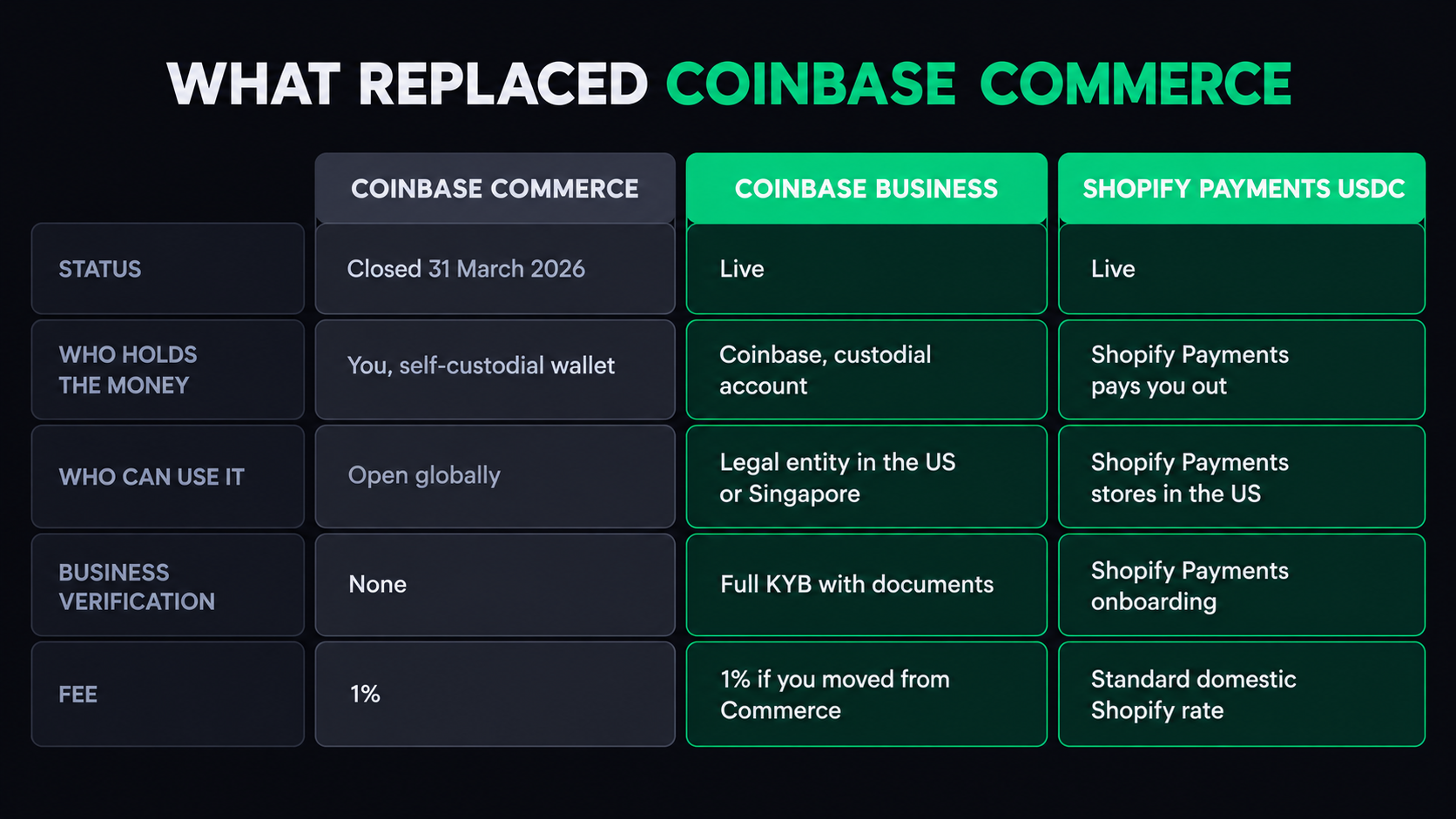
- Coinbase Business is the replacement, and it is a different product: custodial, stablecoin-only (USDC, plus USDT on Ethereum in some jurisdictions) and open only to businesses with a legal entity in the US or Singapore.
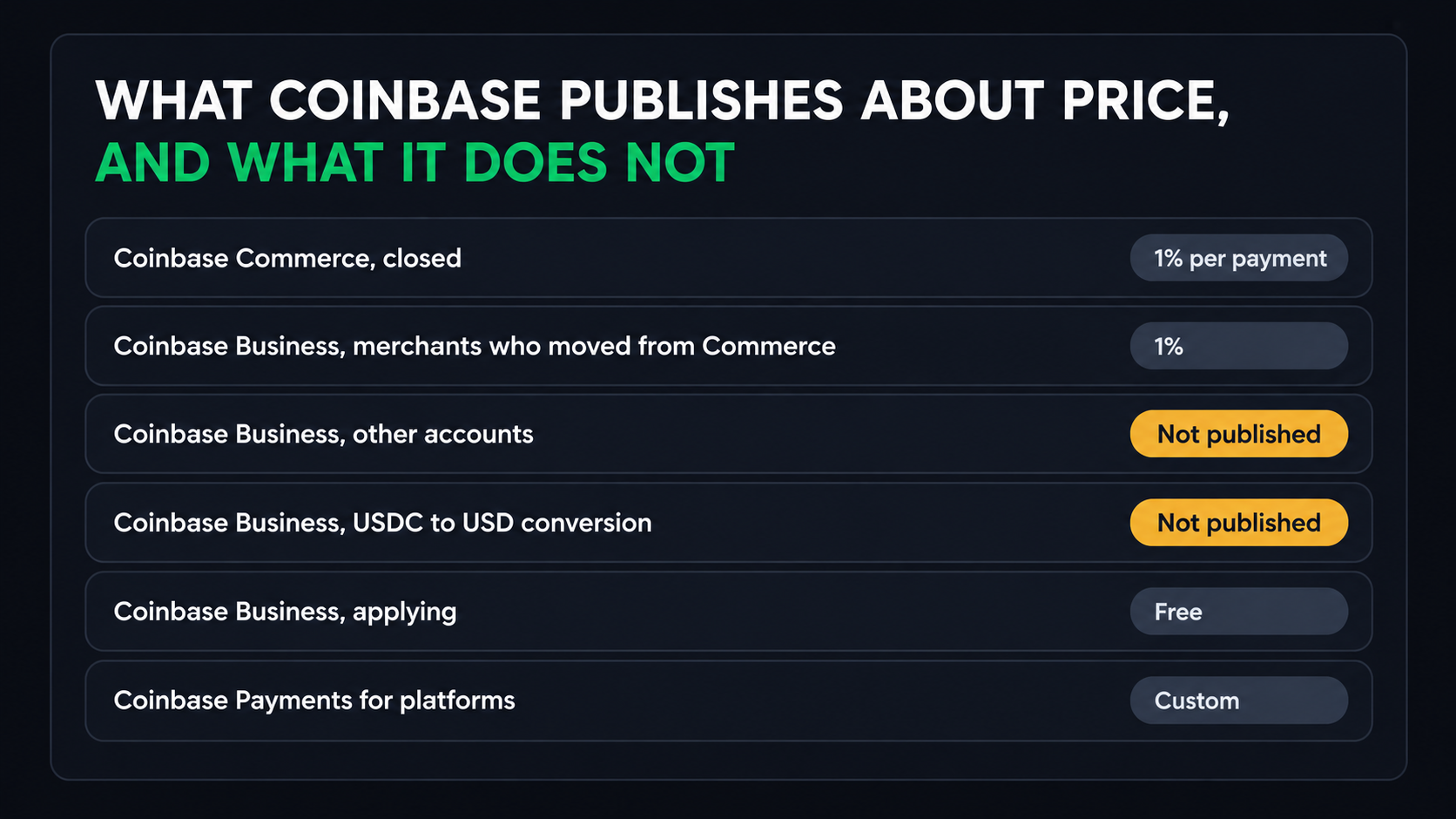
- Fees: merchants who moved from Commerce keep the 1% rate. For other accounts, Coinbase shows the per-payment fee inside the account instead of publishing it.
- On Shopify, USDC is built into Shopify Payments (with Coinbase) in the US (except Alaska, New York and Texas), Mexico, 29 European countries and Hong Kong, at the standard domestic Shopify Payments rate.
- Elsewhere, there is no Coinbase product you can sign up for. Look at non-custodial, no-KYC or fiat-settlement gateways instead (see below).
Last checked: 6 October 2026. We read Coinbase's Commerce-to-Business transition article (the live version matches the copy archived on 12 March 2026), the Coinbase Business product, payment link, checkout and invoice pages, its help articles on payment links, applications and automations, its developer docs, and its announcements from June, October and November 2025. Coinbase has deleted its Commerce fees and 2024 migration help pages, so we used Internet Archive copies of those. We also read Shopify's USDC help page and launch posts, and the Shopify App Store and WordPress.org listings for Coinbase Commerce. On 6 October we requested commerce.coinbase.com, the Commerce API and the Commerce withdrawal page to see what they now return. We have no Commerce wallet and no Coinbase Business account, so nothing here is a first-hand recovery or payment test.
What Happened to Coinbase Commerce, and When
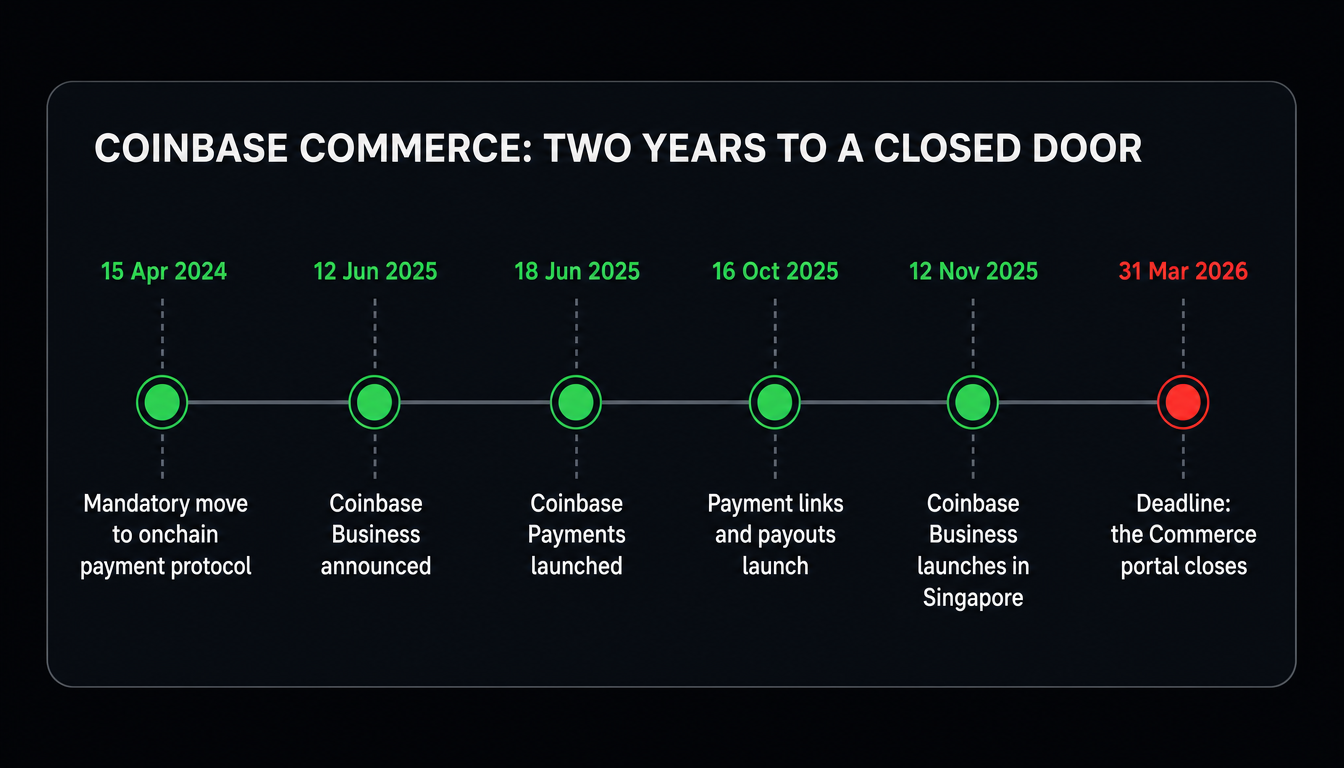
Coinbase Commerce was Coinbase's crypto checkout for merchants. On 16 October 2025, when it added payment links and payouts to Coinbase Business, Coinbase said it would merge Commerce into Coinbase Business over the following months. Its transition article then set a deadline: merchants had to move by 31 March 2026. After that date the Commerce portal would be permanently inaccessible, no new charges could be created and the Commerce withdrawal tool would be switched off.
Coinbase's stated reason is that Commerce was designed for buyers paying in volatile coins and merchants holding their own keys, while businesses now want custody, compliance and easy cash-out. It admits that merchants who valued self-custody and paying in any asset may not find Coinbase Business a good fit.
What we saw on 6 October 2026: commerce.coinbase.com returned an HTTP 502 error, the Commerce API at api.commerce.coinbase.com returned HTTP 503, and the withdrawal page sent us to Coinbase Business. The Commerce app's Shopify App Store page said the app is not currently available, and Coinbase's help centre listed one article under Commerce: the transition guide.
How Commerce Worked, and Where Your Money Is
How Commerce handled money decides where any balance you still have sits today.
- It was self-custodial. When you opened a Commerce account you were given a 12-word seed phrase, which you could write down, back up to Google Drive or both. Coinbase never had the phrase or the funds.
- It was open to anyone. Coinbase's own comparison describes Commerce as available globally with no business verification (KYB).
- It charged 1% per payment, taken in the payment's settlement currency. Pay $100 in ETH with USDC settlement and Coinbase kept 1 USDC.
- From 15 April 2024, customers paid from wallets on Ethereum, Base or Polygon in hundreds of tokens, or with any asset held in a Coinbase account. Bitcoin, Dogecoin, Litecoin and Bitcoin Cash could only be paid from a Coinbase account, not from a self-custody wallet or another exchange.
- Self-managed merchants had each payment swapped to USDC and sent to the EVM deposit address they chose, on the chain the customer paid on. During the 2024 migration they could either keep the Commerce wallet (moved to the Coinbase Wallet interface) or give an address of their own.
- Coinbase-managed merchants settled to their Coinbase Exchange account in USD or USDC instead.
Before the 2024 change, merchants could also receive Bitcoin, Bitcoin Cash, Dogecoin and Litecoin in their Commerce wallet. Coinbase's 2024 migration notes said those coins could still be withdrawn from the Commerce portal, and that portal no longer exists.
How to Recover Funds Left in a Commerce Wallet
The two routes Coinbase offered before the deadline, the dashboard's withdrawal tool and the dashboard's Google Drive backup flow, both closed on 31 March 2026. What you can do now depends on how your account was set up.
If you settled to Coinbase Exchange
Coinbase-managed merchants did not need to reapply. Coinbase says these accounts moved to Coinbase Business automatically: sign in at coinbase.com to see your balance and the bank accounts you had already added. Payments now settle to coinbase.com instead of Coinbase Exchange.
If Commerce paid out to your own wallet
If you gave Commerce the address of a wallet you control, payments that reached it are already yours and need no recovery. Only balances still inside the Commerce wallet itself are affected.
If money is still in the Commerce wallet
- Find the 12-word seed phrase. Coinbase suggests checking password managers, secure notes, physical records and Google Drive.
- Import it into a self-custody wallet that you installed yourself, on a device you control, using its import or restore option. Coinbase names Coinbase Wallet and MetaMask as compatible.
- Expect part of the balance to be missing at first. Commerce created a new address for every payment, so funds can be spread over hundreds or thousands of addresses, and Coinbase says standard wallets typically scan only the first 20 unused addresses.
- Bitcoin and other UTXO coins are the hardest. Coinbase urged merchants with these to use the withdrawal tool before the deadline. It warns that, without it, such funds may become practically inaccessible.
What Coinbase Offers Instead
Coinbase now has three ways to take crypto, aimed at different users. Only the first is something a single business signs up for directly.
Coinbase Business: for businesses taking payments directly
- Payment links, single-use or reusable (you can cap, pause or switch off a reusable link), shared by email, text or QR code. No website needed.
- Invoices, one-off or recurring, sent from the dashboard.
- Checkouts: an API that adds crypto to your own checkout, plus Coinbase Business plugins for WooCommerce, Magento (Adobe Commerce) and WHMCS. Each API checkout takes a single payment.
- What customers pay with: USDC from any wallet on Ethereum, Base, Polygon, Optimism or Arbitrum (the checkout and invoice pages also list Avalanche), and USDT on Ethereum, which Coinbase offers in the US and select jurisdictions. Customers do not need a Coinbase account, and on Base they do not need gas.
- No Bitcoin checkout. Coinbase calls its payment tools stablecoin-only. You can receive Bitcoin into the account, but not through payment links, invoices or checkouts.
- Where the money goes: your custodial Coinbase Business account, in USDC. You can switch on automatic conversion to US dollars (for a fee) and scheduled ACH withdrawals to your bank (daily, weekly or monthly), which arrive in 1 to 3 business days. USDC balances earn rewards; Coinbase advertised 3.60% APY on 6 October 2026 and says the rate varies by region.
- No chargebacks. Stablecoin payments are final, and Coinbase states that it is not a party to your sales. Checkouts can be refunded in full or in part through the API.
- For developers: Commerce API keys do not carry over. You create Coinbase Developer Platform keys with JWT authentication and move to the Checkout APIs, which have a sandbox using test USDC on Base Sepolia. Commerce transaction history did not transfer.
Coinbase Payments: for platforms, not individual shops
Coinbase launched Coinbase Payments on 18 June 2025 as a stablecoin payment stack for payment providers, marketplaces and commerce platforms, and said it already powered USDC on Shopify. Coinbase's developer docs now separate the two routes. Coinbase Business is for businesses accepting payments directly and is self-serve. Payment Acceptance is for payment providers, marketplaces and enterprise platforms. It adds authorise, capture, void and refund controls, fee splits and settlement by Fedwire, SWIFT or USDC, and onboarding takes enhanced due diligence of about a month. Coinbase's payments page names Checkout.com and PPRO as partners offering stablecoin acceptance to their merchants. For most shops, that means you reach Coinbase Payments through a provider that has built it in, not by signing up yourself.
Shopify: USDC through Shopify Payments
Shopify announced USDC payments on 12 June 2025, built with Coinbase and Stripe. You switch it on in the Crypto section of your Shopify Payments payment methods. Shopify's current rules:
- Where: stores on Shopify Payments in the United States (except Alaska, New York and Texas), Mexico, 29 European countries including the UK, Switzerland and Norway, and Shopify Payments Hong Kong. The account representative must live in an eligible region, and Shopify may ask for more verification first. Singapore and Canada are not on the list.
- Networks: Base, Ethereum, Optimism, Polygon and Arbitrum.
- Payout: in your normal Shopify Payments currency and schedule, or, in some regions, claimed as USDC to your own wallet.
- Limits: no subscription products, no partial capture, no post-purchase upsells, and customers cannot open disputes on USDC orders.
The old Coinbase Commerce app is no longer available on the Shopify App Store. For Bitcoin and other coins on Shopify, see our Shopify crypto payment gateway guide.
Who Can Use Coinbase Business
Coinbase Business is open to businesses with a legal entity in the United States or Singapore. Coinbase's transition article promised more countries during 2026. On 6 October 2026 the Coinbase Business page still listed only the US and Singapore and named no new markets.
Unlike Commerce, it needs full business verification. Coinbase says you need a registered business entity and a business bank account, and its application checklist asks for:
- government ID (driver's licence, national ID or passport), including for anyone owning 25% or more of the business;
- formation documents, such as a certificate of incorporation or, for an LLC, articles of organization, matching the entity name on your application;
- a business bank statement issued in the last 90 days (businesses incorporated 12 months ago or less may use a personal account in the applicant's name);
- a tax identification number (an EIN or equivalent);
- a description of what the business does, how it makes money and who its customers are.
Coinbase says the application takes 15 to 30 minutes and most applicants hear back within a few weeks. There is no application fee.
Fees: Commerce, Coinbase Business and Shopify USDC
At 1%, a $250 order costs $2.50 and $20,000 of monthly sales costs $200, before any conversion fee if you take dollars instead of USDC. If you are new to Coinbase Business, check the rate shown when you create your first payment link. Coinbase does not publish it.
Outside the US and Singapore: Where to Go
Coinbase told merchants outside the US and Singapore to move to another provider before 31 March 2026. Unless your payment provider has built in Coinbase Payments, or you sell on Shopify in a USDC region, there is no Coinbase product you can use. The same applies inside those two countries if you want to keep your own keys or take Bitcoin, because Coinbase Business is custodial and stablecoin-only. Choose a replacement by what you relied on in Commerce:
Should You Move to Coinbase Business?
Coinbase Business: pros
- Former Commerce merchants keep the 1% rate
- Payment links, recurring invoices and a checkout API in one account
- WooCommerce, Magento and WHMCS plugins
- USD conversion and scheduled ACH withdrawals to your bank
- No chargebacks; customers need no Coinbase account
- A sandbox for testing integrations
Coinbase Business: cons
- US and Singapore legal entities only
- Custodial: Coinbase holds the funds
- USDC and USDT only; no Bitcoin checkout
- No published fee for new accounts
- Full KYB, including documents for 25% owners
- Commerce history and API keys did not carry over
Replacing Coinbase Commerce?
Compare gateways that, like Commerce, pay straight into a wallet you control.
Compare non-custodial gateways →Frequently Asked Questions
Is Coinbase Commerce still working?
No. Coinbase made the Commerce portal permanently inaccessible after 31 March 2026, and no new charges can be created. On 6 October 2026 commerce.coinbase.com returned an error and the Commerce withdrawal page redirected to Coinbase Business.
How do I get money out of a Coinbase Commerce wallet now?
Import the wallet's 12-word seed phrase into a compatible self-custody wallet; Coinbase names Coinbase Wallet and MetaMask. Because Commerce used a new address for every payment, the wallet may not show your full balance, and Coinbase warns that Bitcoin and other UTXO coins may be practically inaccessible.
Can Coinbase recover my Commerce funds if I lost the seed phrase?
No. Commerce wallets were self-custodial, and Coinbase says it never had access to merchants' seed phrases, so it cannot recover the funds.
What replaced Coinbase Commerce?
Coinbase Business. It is custodial, takes USDC (and USDT on Ethereum in some jurisdictions), settles in USDC to a Coinbase account and is only for businesses with a legal entity in the US or Singapore.
Can I use Coinbase Business outside the US or Singapore?
Not as of 6 October 2026. Coinbase said it would add more countries during 2026 but has not named any, so merchants elsewhere need another gateway.
What does Coinbase Business charge?
Coinbase says merchants who moved from Commerce keep the 1% Commerce rate. For other accounts it charges a fee on each completed payment and shows the rate inside the account. Automatic conversion from USDC to US dollars costs extra.
Does Coinbase Business accept Bitcoin payments?
No. Its payment links, invoices and checkouts accept USDC and USDT only. You can still receive Bitcoin into the account, but not through the payment tools.
Can I still take crypto on Shopify through Coinbase?
Not through the Coinbase Commerce app, which is no longer available on the Shopify App Store. Shopify Payments offers USDC, built with Coinbase, in the US (except Alaska, New York and Texas), Mexico, 29 European countries and Hong Kong.
Sources
- Coinbase help: Transitioning from Coinbase Commerce to Coinbase Business (read 6 October 2026)
- Internet Archive: the same transition article as captured on 12 March 2026
- Coinbase help: Coinbase Commerce section (now lists only the transition article)
- Coinbase help: Coinbase Commerce fees (archived; the live page now returns 404)
- Coinbase help: Migrating to the Onchain Payment Protocol (archived; the live page now returns 404)
- Coinbase blog: Introducing Coinbase Business (12 June 2025)
- Coinbase blog: Coinbase and Shopify bring USDC payments on Base to merchants (12 June 2025)
- Coinbase blog: Introducing Coinbase Payments (18 June 2025)
- Coinbase blog: business payment tools on Coinbase Business, and the plan to merge Commerce (16 October 2025)
- Coinbase blog: Coinbase Business launches in Singapore (12 November 2025)
- Coinbase Business: product page (availability FAQ and fee footnotes)
- Coinbase Business: payment links
- Coinbase Business: checkouts (networks, plugins)
- Coinbase Business: invoices
- Coinbase help: create payment links and invoices for Coinbase Business
- Coinbase help: Coinbase Business application requirements
- Coinbase help: Coinbase Business application process and timeline
- Coinbase help: automate withdrawals and liquidation
- Coinbase Developer Platform: Coinbase Business Checkout APIs (target of the Commerce migration link)
- Coinbase Developer Platform: Checkout APIs sandbox
- Coinbase Developer Platform: Payment Acceptance (Coinbase Business vs platform integration)
- Coinbase: Payments (stablecoin payments for platforms)
- Coinbase Commerce Funds Access page (now redirects to coinbase.com/business; requested 6 October 2026)
- Shopify Help Center: USDC payments with Shopify Payments
- Shopify news: stablecoins on Shopify with Coinbase and Stripe (12 June 2025)
- Shopify: accept USDC on Base with Shopify Payments (pricing note, 12 June 2025)
- Shopify App Store: Coinbase Commerce (not currently available)
- WordPress.org: Coinbase Commerce plugin (closed 5 October 2026)
- BTCPay Server: homepage
- CoinGate: pricing